The usual objection to enterprise AI is not that it does not work. It is that making it work means posting your contracts, patient records or customer data to somebody else's model. For a bank, a hospital or a defence supplier that ends the conversation before the pilot starts.
It does not have to. Running AI on your own infrastructure is a solved deployment problem, and the integration layer is where it is solved.
Can you run AI on your own infrastructure without sending data to a cloud model?
Yes. IntelliPaaS connects enterprise systems to models running on your own hardware, so prompts, documents and results stay inside your network. The same flows run in cloud, hybrid, on-premises and fully air-gapped deployments with no outbound internet access.
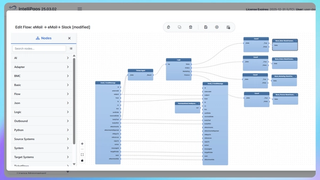
The pieces are ordinary. A self-hosted model such as one served through Ollama runs on your own GPUs. IntelliPaaS reads from the source system, applies whatever masking or filtering the policy requires, calls the local model and writes the result back. Nothing in that path needs a public endpoint.
What actually stays inside
On-premises AI is worth doing only if the whole path is local. Four things have to stay in:
- The model weights. Served from your own infrastructure rather than called over an API.
- The prompt and its context. This is where the sensitive data actually sits. A local model called with context assembled by a cloud integration engine has already leaked.
- The output. Generated text often reproduces the input, so it carries the same classification as the source record.
- The logs. Prompt and response logging is where AI deployments quietly lose data. Ask where the trace goes.
The third and fourth are the ones evaluations miss. A platform that runs a local model but ships failed payloads to a hosted error console has moved your data out through the back door.
How do you govern what an AI agent is allowed to reach?
You govern an AI agent by giving it access through the same controlled connectors your people use, not through credentials pasted into a script. IntelliPaaS supports the Model Context Protocol (MCP), so an agent reaches enterprise systems through governed tools under role-based access control, PII masking and audit trails. Every action it takes is attributable and logged.
That is the difference between an agent that can be put in front of an auditor and one that cannot. The MCP server integration page covers the transports and the tool model, and AI compliance covers the controls applied to agent activity.
How it works end to end
- Deploy the model inside your network. On your own GPUs, served locally. IntelliPaaS treats it as it would any other endpoint.
- Connect the source systems. The systems holding the data are the ordinary ones, and they do not move.
- Apply masking before the model call, not after. PII masking runs in the flow, so identifiers never reach the prompt in the first place.
- Call the model from inside the flow. The request never leaves the network. In an air-gapped deployment there is no route out for it to take.
- Write back and record the lineage. The result lands in the target system, and data lineage records which source record produced it, which is what makes a generated field defensible later.
Where a hosted model is acceptable for some workloads and not others, the same platform handles both: OpenAI and Google Gemini connectors sit alongside the local one, and the flow decides which data is allowed to reach which model. Pinecone and Snowflake cover the retrieval and warehouse side.
Frequently asked questions
What is on-premises AI?
On-premises AI means running the model on hardware you control rather than calling a hosted API, so prompts and outputs stay inside your network. IntelliPaaS connects enterprise systems to locally served models, applying PII masking, role-based access control and audit trails in the flow. It runs the same way in on-premises and fully air-gapped deployments.
Can AI run in an air-gapped environment?
Yes. A locally served model needs no internet access, and neither does IntelliPaaS, which runs fully air-gapped with no outbound connection for licensing, configuration or telemetry. That combination is what lets defence, intelligence and critical infrastructure environments use AI on classified data at all.
How do I stop an AI agent reaching data it should not?
Give the agent tools rather than credentials. IntelliPaaS exposes enterprise systems to agents through the Model Context Protocol (MCP) under role-based access control, so an agent can only invoke the specific operations its role permits, with PII masking applied and every call written to an audit trail.
Is a self-hosted model good enough for enterprise work?
For extraction, classification, summarisation and routing, which is most integration work, locally served models are generally sufficient. IntelliPaaS lets you route per flow, so a document classification step can use a local model while a lower-sensitivity task uses a hosted one, without maintaining two integration stacks.
What does the integration platform add over calling the model directly?
It supplies the context and handles what happens next. IntelliPaaS reads the source record from systems like SAP S/4HANA or ServiceNow, masks what the policy requires, calls the model, writes the result back and records the data lineage, so a generated value can be traced to the record that produced it.
Where to start
Pick one workload where the data is the blocker rather than the model: document classification, ticket triage or record matching. Run it against a local model end to end and check the logs afterwards to confirm nothing left. If the environment is fully isolated, the air-gapped deployment page covers how that is set up. To scope it against your own systems, talk to our team.