ServiceNow <-> Power BI

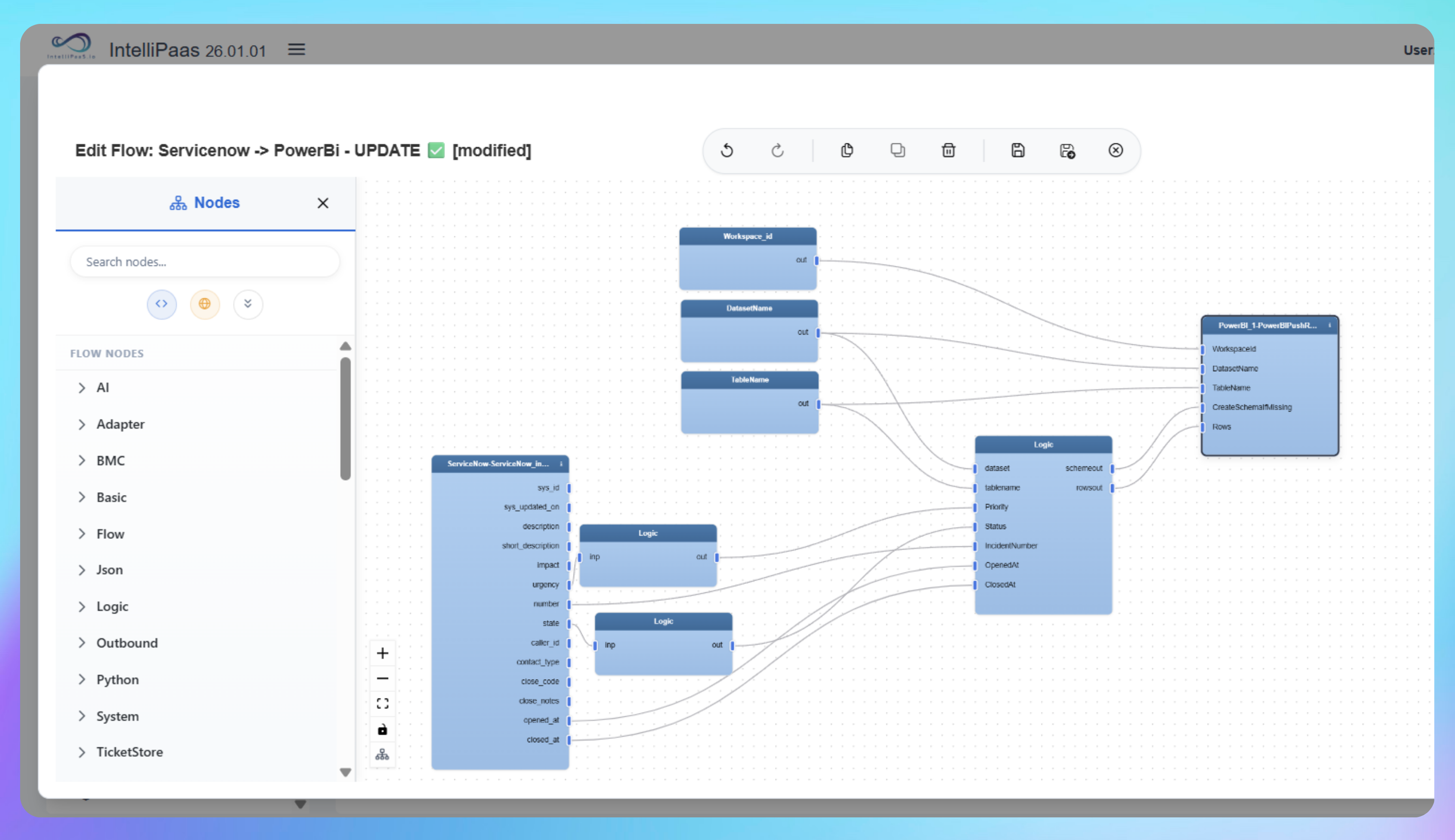
Automated real-time push of ServiceNow incident data to Power BI so dashboards showing ticket volumes, priorities, durations and SLA compliance always reflect the current state of your IT service operations.

Operations, support and leadership teams relying on ServiceNow incident data in Power BI typically wait for manual exports or scheduled refreshes before they can review performance. By the time a dashboard is updated, the data may be hours behind - open tickets look closed, resolved issues are missing, and SLA calculations are based on yesterday's numbers. This integration pack connects ServiceNow and Power BI via the IntelliPaaS Push Rows connector so every incident create and update event is pushed to Power BI immediately. Dashboards reflect live metrics including total ticket count, open versus closed counts, priorities, incident durations and SLA compliance - updating in real time as incidents move through New, Resolved and Closed states. Operations, support and leadership teams can monitor performance live, spot issues early and drive data-informed improvements without ever running a manual export.
IntelliPaaS Logo
ServiceNow + Power BI

Real-Time ServiceNow Incident Reporting and SLA Dashboards in Power BI

See how IntelliPaaS pushes ServiceNow incident create and update events to Power BI in real time - tracking ticket counts, status changes, incident durations and SLA compliance as incidents move from New to Resolved to Closed.
IntelliPaaS Logo
Why Deploy This Use Case
  • A Power BI dashboard shows ten total incidents with five currently open - a baseline before a new incident is created.
  • A new incident is created in ServiceNow with ID 10008, priority Low and status New - IntelliPaaS processes the event and the dashboard immediately updates to eleven total tickets with the new incident listed as open.
  • The incident status is changed to Resolved in ServiceNow with a resolution reason added - IntelliPaaS processes the update and the dashboard reflects the resolved status.
  • The incident is changed to Closed - IntelliPaaS sends the final update and the Power BI report shows the ticket as closed with calculated incident duration and SLA details, for example resolved within three minutes contributing to ninety-eight percent SLA performance.

Use Case Highlights

Real-time incident sync
Every ServiceNow incident create and update event is pushed to Power BI immediately so dashboards always display the current total ticket count, open versus closed counts and priorities.
Live status and priority tracking
Incident status changes from New to Resolved to Closed push to Power BI in real time so leadership and operations teams always see the current state of the IT service queue.
Automatic duration calculation
Incident durations are calculated automatically as status changes flow through so Power BI displays accurate time-to-resolve figures without any manual calculation.
Live SLA compliance reporting
SLA compliance metrics update in Power BI as each incident closes so operations and leadership teams always review current SLA performance rather than last week's export.
Instant operational visibility
Operations and support teams spot backlogs, bottlenecks and priority imbalances in real time because Power BI reflects every incident change the moment it happens in ServiceNow.
Eliminated manual exports
Manual reporting cycles, CSV exports and scheduled refresh jobs are eliminated - Power BI stays current automatically as ServiceNow incidents are created, updated and closed.
AI-Enhanced Data Transformation
This is some text inside of a div block.
Visual Flow Builder
This is some text inside of a div block.
Pro-Code Extensibility
This is some text inside of a div block.
Global Deployment Options
This is some text inside of a div block.
Enterprise-Grade Security
This is some text inside of a div block.
Observability & Monitoring
This is some text inside of a div block.
Connect all your applications
IntelliPaaS Logo
Try for Free

Try for Free

Whether you’re exploring IntelliPaaS, need product guidance, or want to book a tailored demo – we’re here to help.
Tell us how we can help
IntelliPaaS Logo
Thank you! Your submission as been received.
Thank you! Your submission has been received!
Oops! Something went wrong while submitting the form.

Ready to Take Control of Your Integrations?

Request your access to IntelliPaaS and see how teams like yours are eliminating risk, accelerating time-to-value and simplifying complexity.