ServiceNow to Confluence Knowledge

ServiceNow <-> Confluence

Automated AI-summarised Confluence knowledge articles from resolved ServiceNow incidents so IT teams capture fix documentation without any manual writing step.

When an IT engineer resolves a ServiceNow incident, the troubleshooting steps, resolution details and incident context that could help the next engineer with the same problem rarely make it into Confluence. Writing up a knowledge article manually is deprioritised under pressure and often skipped entirely. This integration pack monitors ServiceNow for incidents moved to the Resolved status with a resolution reason and automatically creates a structured Confluence page using AI. The AI summarisation step produces a concise overview alongside the full incident title and description so the article is immediately useful. Only completed incidents are published so the Confluence space stays focused on proven fixes rather than work in progress.
IntelliPaaS Logo
ServiceNow + Confluence

Automated AI Knowledge Article Creation from Resolved ServiceNow Incidents

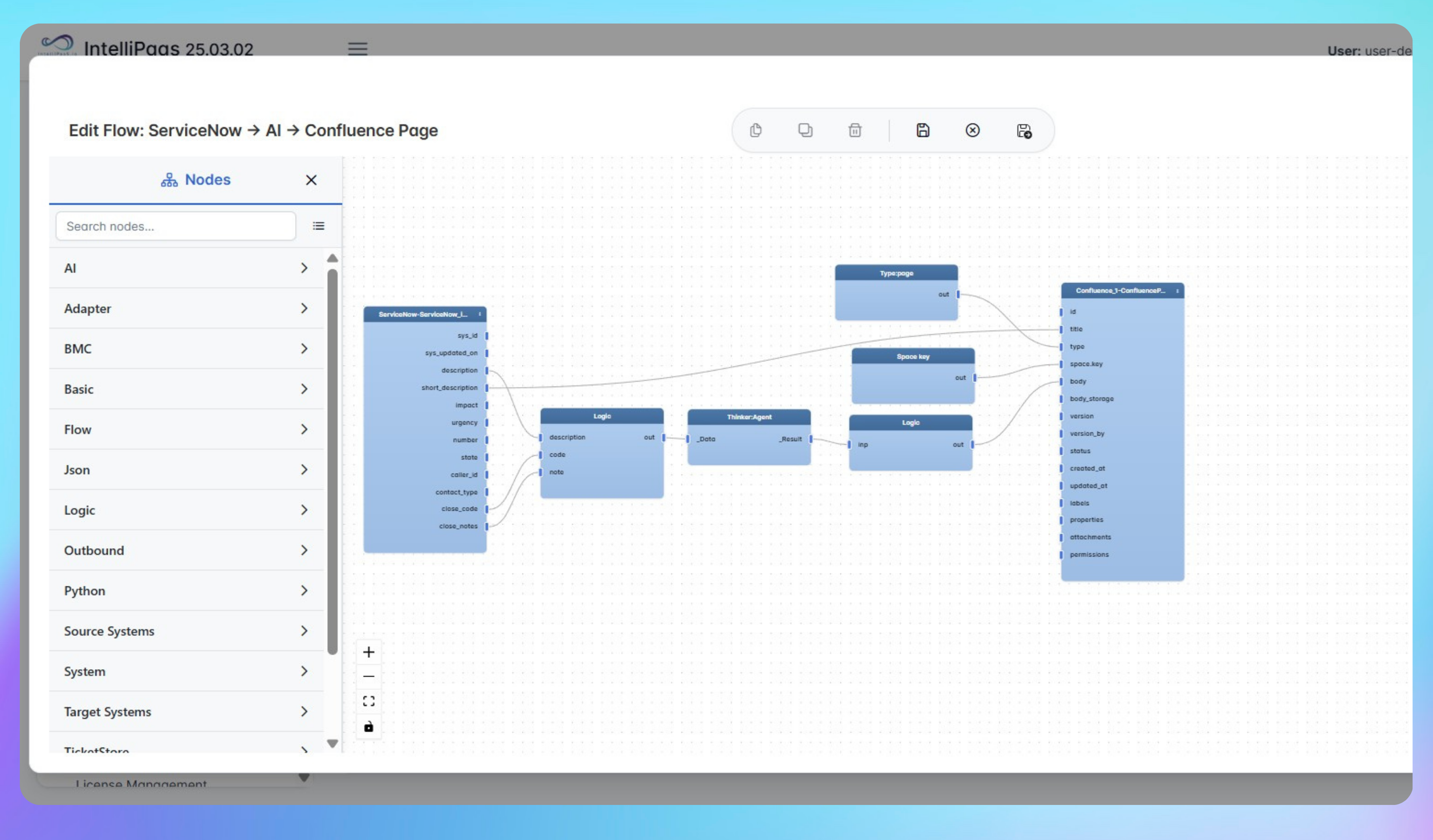
See how IntelliPaaS detects a resolved ServiceNow incident, runs AI summarisation on the incident details and automatically creates a structured Confluence knowledge article with the incident title and a concise resolution summary.
IntelliPaaS Logo
Why Deploy This Use Case
  • A ServiceNow incident is moved to the Resolved status with a resolution reason added - IntelliPaaS detects the update immediately.
  • IntelliPaaS triggers the AI summarisation step which processes the incident title, description and resolution details to generate a concise article overview.
  • A new Confluence page is created automatically with the incident title as the page title - for example "Wireless access in area down" - and the AI summary plus full incident details in the body.
  • The article is published to the configured Confluence space immediately and is searchable by the IT team from the moment the incident is resolved.

Use Case Highlights

Automatic article creation
Every ServiceNow incident moved to Resolved with a resolution reason automatically generates a structured Confluence knowledge article with incident title, AI summary and full description.
AI-generated article summary
The AI summarisation step produces a concise overview of each incident and resolution so the Confluence article is immediately readable and useful for the next engineer.
Resolved-only publishing
Only incidents with a confirmed resolution reason are published so the Confluence space stays focused on proven, completed fixes rather than in-progress tickets.
Faster future resolutions
IT engineers search Confluence and find a documented fix the next time the same incident type occurs - reducing investigation time and repeat escalations to senior engineers.
Eliminated manual documentation
Every resolved incident is automatically documented in Confluence without anyone writing a single word - the integration captures the knowledge at the point of resolution.
Faster engineer onboarding
New IT engineers find real-world resolution examples in Confluence from day one so they ramp faster and escalate less during their first months.
AI-Enhanced Data Transformation
This is some text inside of a div block.
Visual Flow Builder
This is some text inside of a div block.
Pro-Code Extensibility
This is some text inside of a div block.
Global Deployment Options
This is some text inside of a div block.
Enterprise-Grade Security
This is some text inside of a div block.
Observability & Monitoring
This is some text inside of a div block.
Connect all your applications

Connectors in this Pack

Explore the individual connectors used in this integration:

IntelliPaaS Logo
Try for Free

Try for Free

Whether you’re exploring IntelliPaaS, need product guidance, or want to book a tailored demo – we’re here to help.
Greeting icon
Tell us how we can help
IntelliPaaS Logo
Thank you! Your submission as been received.
Thank you! Your submission has been received!
Oops! Something went wrong while submitting the form.

Ready to Take Control of Your Integrations?

Request your access to IntelliPaaS and see how teams like yours are eliminating risk, accelerating time-to-value and simplifying complexity.