


ROLLER to Salesforce Product Sync
ROLLER Products <-> Salesforce Products
Automatically sync every new ROLLER product to Salesforce so your sales team always quotes from an accurate, up-to-date catalogue without manual data entry.
IntelliPaaS Integration Pack for ROLLER and Salesforce keeps your product catalogue perfectly synchronized between your ticketing platform and your CRM. When a new product, experience, or ticket type is created in ROLLER, IntelliPaaS automatically creates a corresponding Product record in Salesforce. Similarly, when prices or details are updated in ROLLER, those changes are reflected in your Salesforce product catalogue, ensuring your sales team always works with current, accurate information when building quotes and Opportunities.
The catalogue synchronisation problem between operational systems and CRM is one of the most common sources of revenue leakage in venues that offer group bookings and corporate experiences. When sales teams are quoting from stale or manually maintained product lists in Salesforce, they risk quoting incorrect prices, offering discontinued experiences, or missing newly launched products entirely. Each of these errors either costs revenue or damages the professional credibility of your sales team in front of potential corporate clients. IntelliPaaS eliminates this risk by making ROLLER the single source of truth and automatically propagating every product change to Salesforce in real time.
The operational efficiency gains extend well beyond error reduction. With a live, accurate product catalogue in Salesforce, sales teams can build Opportunity Line Items faster and with greater confidence, reducing the time from initial enquiry to signed proposal. New seasonal experiences or promotional ticket types launched in ROLLER are immediately available for quoting in Salesforce without any manual CRM administration work from the sales team. Finance and revenue teams benefit from consistent product naming and pricing across both systems, which simplifies revenue reporting and eliminates the reconciliation work that typically arises when product catalogues drift out of sync between platforms.
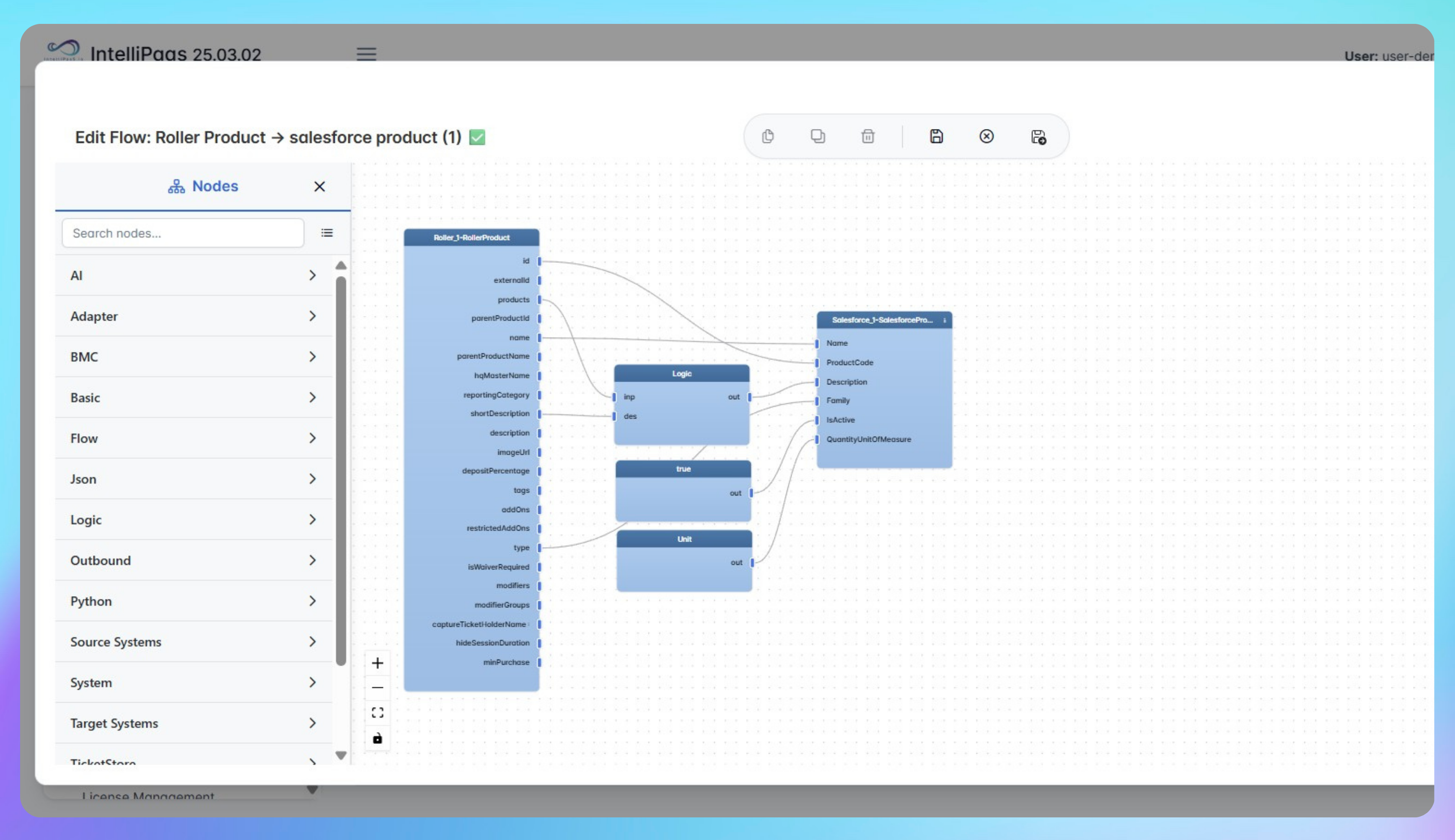

Automated Product Creation from ROLLER to Salesforce
- A new product, experience, or ticket type is created in ROLLER and IntelliPaaS detects the product creation event in real time via the ROLLER API or webhook.
- IntelliPaaS maps the product details—including name, description, price, and any configured attributes—to the corresponding Salesforce Product and Price Book Entry fields.
- A new Product record is created in Salesforce and added to the relevant Price Book, making it immediately available for sales teams to add to Opportunities and Quotes without any manual CRM entry.
- When an existing product is updated in ROLLER, IntelliPaaS detects the change and updates the corresponding Salesforce Product record, ensuring the catalogue stays consistent across both platforms at all times.
Use Case Highlights








Connectors in this Pack
Explore the individual connectors used in this integration:


Try for Free

.svg)


