


ROLLER to Salesforce Customer Sync
ROLLER Guests <-> Salesforce Accounts
Automatically create and update Salesforce CRM records from every ROLLER guest booking, giving sales and marketing a 360-degree view of your entire customer base.
IntelliPaaS Integration Pack for ROLLER and Salesforce transforms your venue's guest data into a powerful CRM asset. When a guest makes a purchase or creates a booking in ROLLER, IntelliPaaS automatically creates or updates their record in Salesforce as a Contact or Lead. Key data points such as booking history, spending levels and visit frequency are synchronized, giving your sales and marketing teams a 360-degree view of every customer.
Without this integration, ROLLER and Salesforce operate as disconnected silos—and the cost of that disconnect is significant. Sales teams trying to qualify corporate event leads have no visibility into how many times that company's staff have already visited your venue. Marketing teams building re-engagement campaigns don't know who last visited three months ago versus twelve months ago. Every insight that should be driving commercial decisions sits locked inside ROLLER, inaccessible to the teams who need it most. IntelliPaaS closes this gap by making every guest interaction in ROLLER immediately visible in Salesforce, giving your entire commercial team a live, accurate view of your customer base.
The strategic value compounds over time as your Salesforce CRM accumulates a rich history of guest behaviour. Sales teams can identify high-value accounts by total lifetime spend, filter for guests who have attended multiple event types, and prioritise outreach to lapsed high-frequency visitors. Marketing can build precise segments based on recency, frequency, and monetary value—the classic RFM framework—directly from ROLLER data synced into Salesforce. These capabilities transform what was previously a transactional ticketing dataset into a strategic commercial intelligence tool that drives membership sales, group bookings, and long-term customer lifetime value.
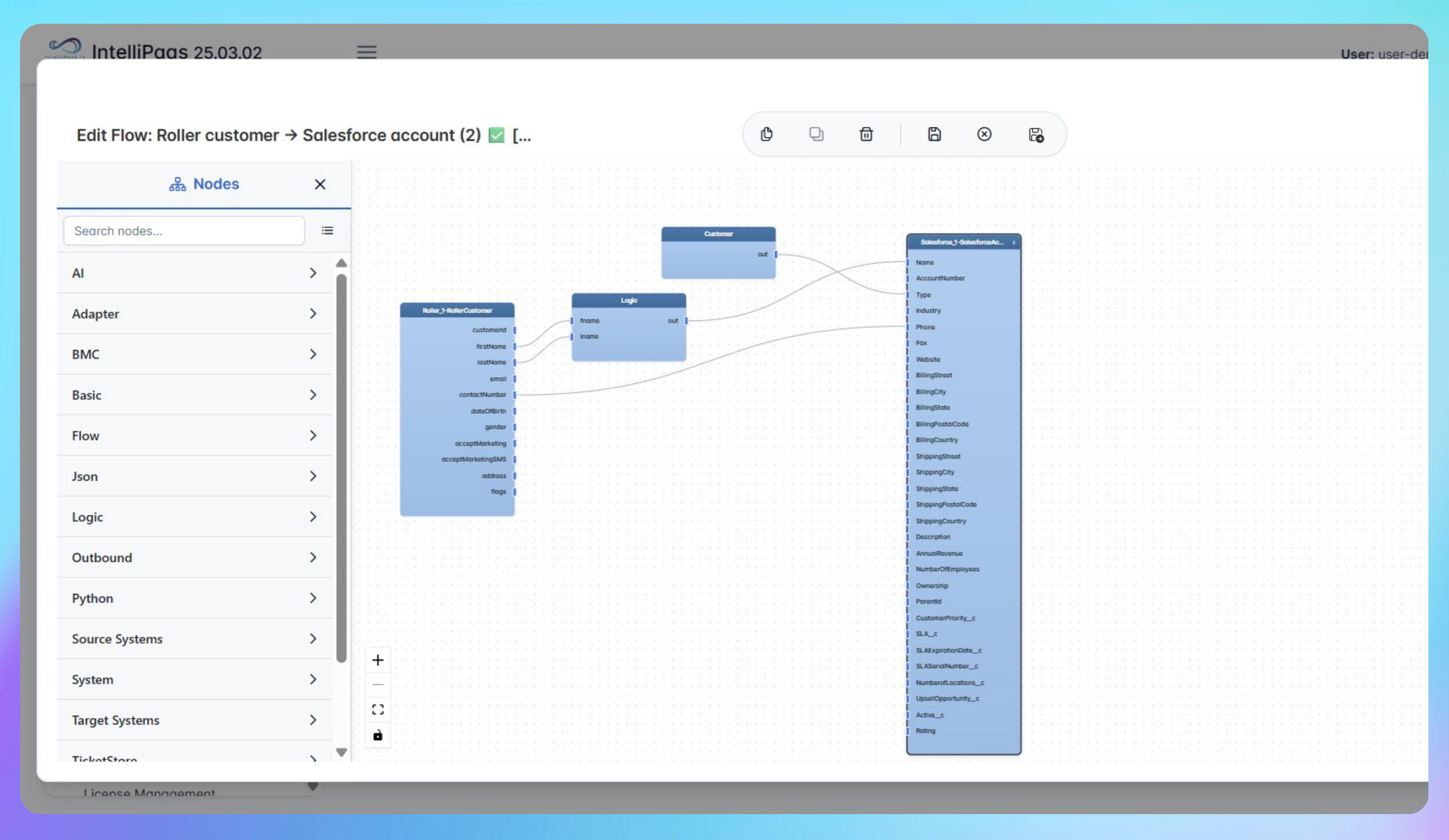

Automated Customer Creation from ROLLER to Salesforce Accounts
- A guest completes a booking or purchase in ROLLER, triggering an event that IntelliPaaS detects in real time and begins processing for CRM synchronisation.
- IntelliPaaS searches Salesforce for an existing Contact or Lead matching the guest's email address—if found, it updates the record with the latest booking data; if not, it creates a new Contact with the guest's full profile details.
- Key data fields including booking type, total spend, visit date, and product categories are mapped to the appropriate custom or standard fields in Salesforce, ensuring the CRM record reflects the guest's complete interaction history.
- The updated Salesforce record is immediately available to sales and marketing teams, enabling targeted outreach, membership offers, and personalised campaign activation based on real guest behaviour data.
Use Case Highlights








Connectors in this Pack
Explore the individual connectors used in this integration:


Try for Free

.svg)


