


PagerDuty to Jira Incidents
PagerDuty <-> Jira
Automatically create a linked Jira issue for every PagerDuty incident, giving engineering teams full incident tracking inside their existing workflow.
IntelliPaaS Integration Pack for PagerDuty and Jira streamlines your incident management workflow by creating a seamless bridge between your on-call alerting platform and your engineering issue tracker. When a new incident is triggered in PagerDuty, IntelliPaaS automatically creates a corresponding Jira issue, pre-populated with the incident's name, severity, and a direct link back to PagerDuty. This ensures engineering teams can track, investigate, and resolve incidents within their existing Jira workflow.
The friction that typically exists between PagerDuty and Jira is a hidden tax on your engineering team's time. On-call engineers receive an alert, begin investigating, and then have to manually create a Jira ticket, copy across the incident details, set the priority, and notify the relevant team—all while the incident is still active. This context-switching slows response times and introduces inconsistency in how incidents are documented. IntelliPaaS eliminates these manual steps entirely, so engineers can move directly from receiving the alert to investigating the root cause without any administrative overhead.
Over time, the integration delivers compounding operational benefits through better data. Every PagerDuty incident that automatically creates a Jira issue contributes to a structured historical record of incidents, their severity, resolution time, and the teams involved. Engineering leaders can analyse this data to identify recurring failure patterns, measure mean time to resolution trends, and make the case for infrastructure investments that prevent future incidents. The bidirectional visibility—where support teams see Jira status and engineering teams see PagerDuty severity—also ensures no stakeholder is left out of the loop during a live incident.
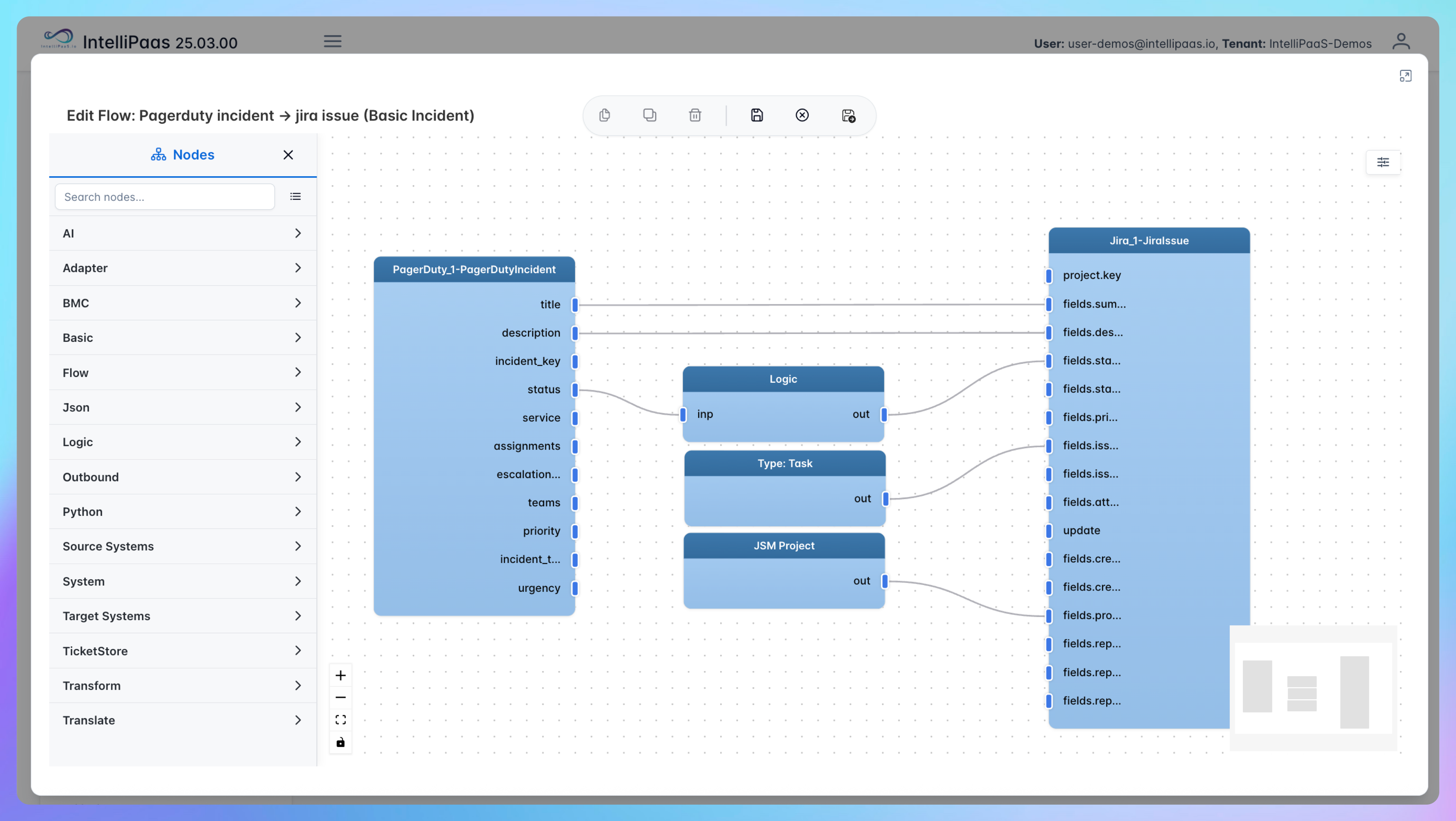

Automated Incident Sync from PagerDuty to Jira
- A new incident is triggered in PagerDuty—either by a monitoring alert or manually—and IntelliPaaS detects the event in real time via the PagerDuty webhook integration.
- IntelliPaaS extracts the incident details, including the title, severity level, affected service, and PagerDuty incident URL, and maps them to the appropriate Jira issue fields and priority settings.
- A new Jira issue is automatically created in the designated project, pre-populated with all the extracted incident data, and assigned to the relevant engineering team or on-call squad based on configurable routing rules.
- The Jira issue ID and URL are sent back to PagerDuty as an incident note, creating a two-way reference so both platforms stay linked throughout the investigation and resolution process.
Use Case Highlights








Try for Free

.svg)


