


PagerDuty to Freshdesk Security Alerts
PagerDuty <-> Freshdesk
Automatically create a Freshdesk ticket for every PagerDuty incident, keeping your IT and support teams instantly aligned when customer-facing services are affected.
IntelliPaaS Integration Pack for PagerDuty and Freshdesk bridges the gap between your infrastructure monitoring and customer support operations. When PagerDuty triggers an incident related to a customer-facing service, IntelliPaaS automatically creates a corresponding Freshdesk ticket, ensuring your support team is immediately aware of service issues that may impact customers. This eliminates the manual process of cross-posting incidents and ensures both teams operate from a single, shared understanding of ongoing issues.
The gap between operations and support during a live incident is one of the most damaging inefficiencies in service delivery. While the engineering team is actively working a PagerDuty incident, the support team is fielding calls and emails from confused customers who are experiencing degraded service—with no context to provide them. Without an automated bridge between the two systems, support agents either have no information, or they rely on someone from engineering remembering to send a Slack message in the middle of firefighting. IntelliPaaS removes this dependency entirely. The moment PagerDuty fires, Freshdesk has a ticket with all the details—no human handoff required.
The ongoing operational benefits compound with every incident handled. Support agents can reference the Freshdesk ticket to give customers accurate, real-time status updates without interrupting the engineering team. When the incident is resolved in PagerDuty, that status change can trigger an automatic update to the Freshdesk ticket, prompting support to notify affected customers proactively. Over time, the linked records in both systems create a valuable audit trail that reveals which services cause the most customer impact, helping leadership prioritise reliability investments where they matter most to customer satisfaction and retention.
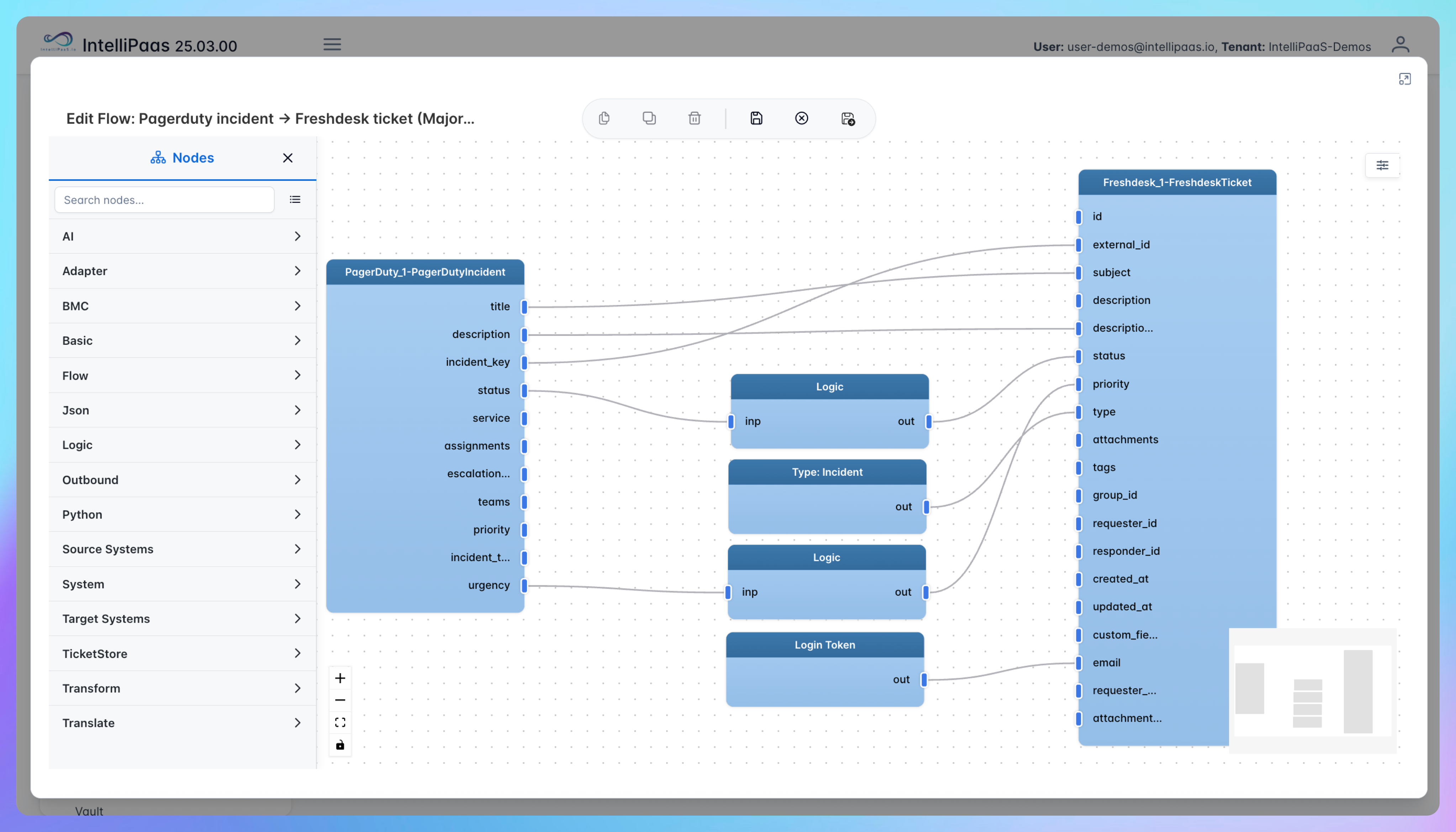

Automated Security Incident Ticketing from PagerDuty to Freshdesk
- A new incident is triggered in PagerDuty—either by an automated monitoring alert or a manual escalation—and IntelliPaaS detects the event in real time via the PagerDuty webhook.
- IntelliPaaS extracts the incident details including the title, severity, affected service name, and a link back to the PagerDuty incident, then maps them to the corresponding Freshdesk ticket fields.
- A new high-priority Freshdesk ticket is created automatically and routed to the designated support team or group, ensuring the right agents are aware of the service issue without any manual notification.
- When the PagerDuty incident is resolved, IntelliPaaS detects the status change and updates the Freshdesk ticket accordingly, closing the loop and prompting the support team to follow up with affected customers.
Use Case Highlights










Try for Free

.svg)


