Dynatrace to ServiceNow Incidents

Dynatrace <-> ServiceNow

Automated incident creation from Dynatrace problems to ServiceNow for faster IT response.

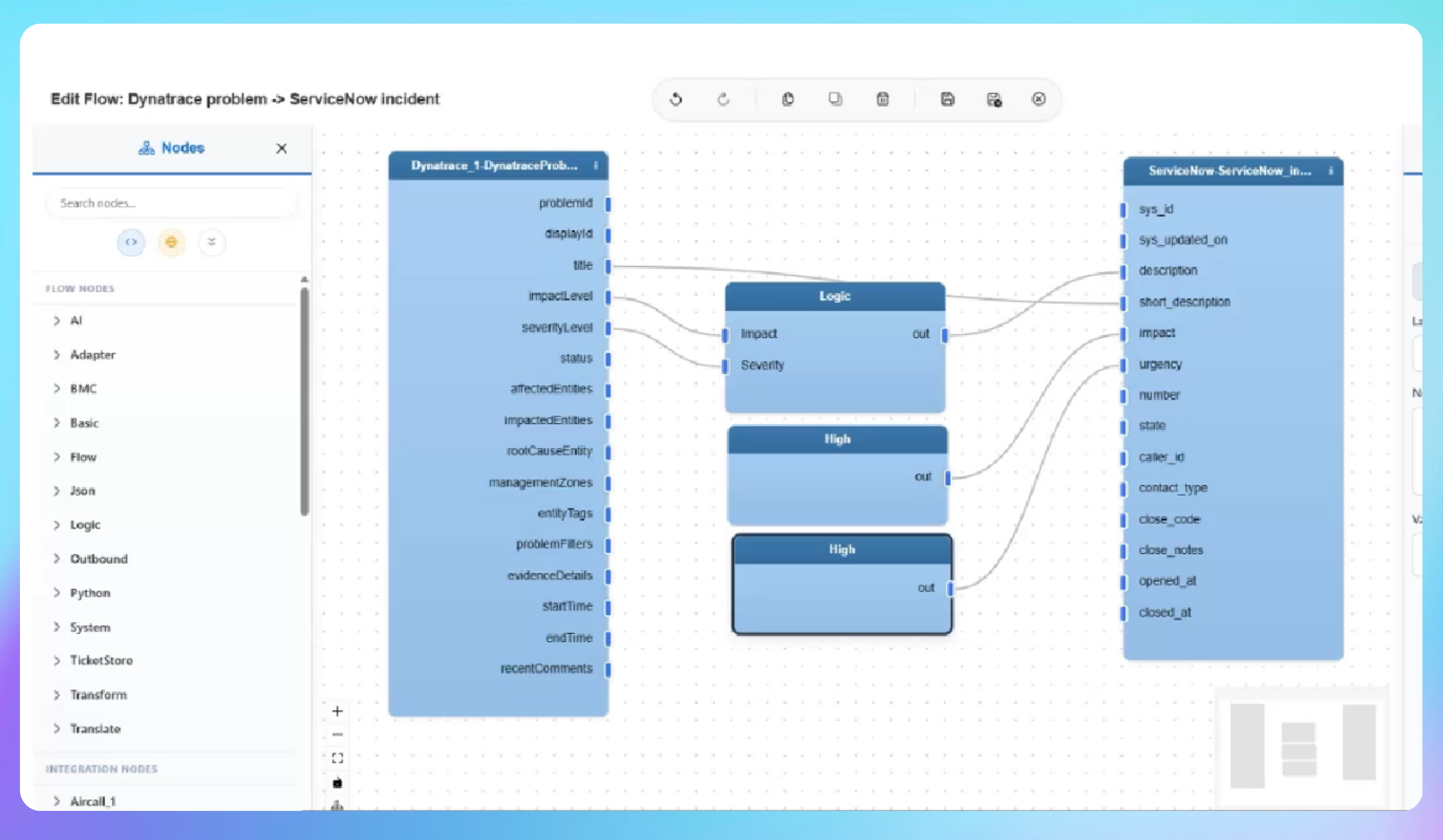
When Dynatrace detects a critical performance problem, every second matters. This integration pack automatically creates a high-priority incident in ServiceNow the moment a problem is logged in Dynatrace, eliminating manual monitoring and ensuring your support teams are alerted without delay. IntelliPaaS listens continuously for new Dynatrace problem alerts, extracts key details such as the problem title and severity, and pushes them directly into ServiceNow with the correct priority assigned. Critical issues reach the right team the moment Dynatrace fires the alert - with no manual step in between.

Without this integration, operations teams must keep a continuous eye on the Dynatrace dashboard and manually raise ServiceNow tickets each time a problem appears. During high-pressure incidents that hand-off is easily missed or delayed, leaving service management teams unaware of active performance degradations until an end user reports them. The result is longer mean time to acknowledge, slower escalation and a greater chance of customer-facing impact compounding before the right people are engaged.

With the integration running, operations engineers rely on IntelliPaaS to bridge monitoring and ITSM automatically. A Dynatrace problem fires and within moments a structured, high-priority ServiceNow incident exists with the correct title and severity — ready for assignment, SLA tracking and resolution workflow. Teams stop watching dashboards manually and start acting on properly contextualised tickets, making every shift more efficient and every major incident easier to coordinate across functions.
IntelliPaaS Logo
Dynatrace + ServiceNow

See Automated Incident Creation in Action

Watch how IntelliPaaS detects a Dynatrace problem and automatically generates a high-priority ServiceNow incident in real time.
IntelliPaaS Logo
Why Deploy This Use Case
  • A performance problem is triggered via the Dynatrace API to simulate a real incident
  • The problem is confirmed as logged and visible in the Dynatrace dashboard
  • IntelliPaaS detects the inbound Dynatrace event and processes the payload successfully
  • A matching high-priority incident is automatically created in ServiceNow with the exact problem title from Dynatrace

Use Case Highlights

Instant incident creation
Dynatrace problems automatically generate high-priority ServiceNow incidents in real time.
Automated priority assignment
Problem severity is mapped directly to ServiceNow priority so critical issues are never missed.
Eliminated manual monitoring
Teams stop watching dashboards manually and let IntelliPaaS trigger the response.
Faster response times
Support teams receive actionable tickets the moment an issue is detected.
Reduced alert fatigue
Structured incidents replace noisy manual alerts so teams act on what matters.
Monitoring to ITSM automation
Every Dynatrace problem detection automatically creates a structured ServiceNow incident - no manual handoff between application monitoring and IT service management.
AI-Enhanced Data Transformation
This is some text inside of a div block.
Visual Flow Builder
This is some text inside of a div block.
Pro-Code Extensibility
This is some text inside of a div block.
Global Deployment Options
This is some text inside of a div block.
Enterprise-Grade Security
This is some text inside of a div block.
Observability & Monitoring
This is some text inside of a div block.
Connect all your applications

Connectors in this Pack

Explore the individual connectors used in this integration:

IntelliPaaS Logo
Try for Free

Try for Free

Whether you’re exploring IntelliPaaS, need product guidance, or want to book a tailored demo – we’re here to help.
Greeting icon
Tell us how we can help
IntelliPaaS Logo
Thank you! Your submission as been received.
Thank you! Your submission has been received!
Oops! Something went wrong while submitting the form.

Ready to Take Control of Your Integrations?

Request your access to IntelliPaaS and see how teams like yours are eliminating risk, accelerating time-to-value and simplifying complexity.