BMC Helix to Jira AI Sync

BMC Helix <-> Jira

Automated BMC Helix ITSM to Jira ticket sync with AI translation into traditional Chinese and SLA enrichment for global IT teams.

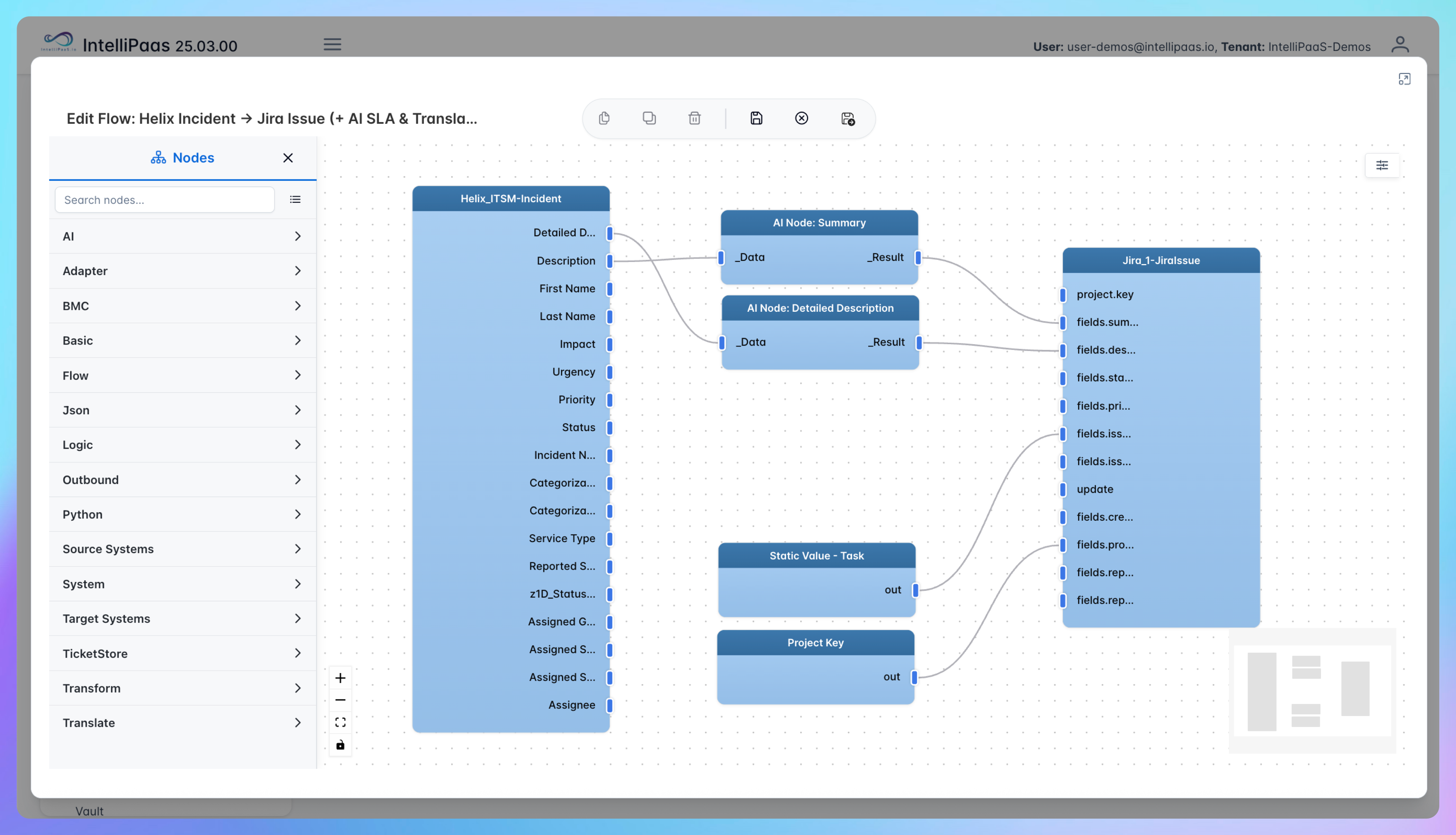
When your IT operations team logs incidents in BMC Helix ITSM and your development or service desk team works in Jira, tickets have to be manually re-entered across both platforms - and for global teams working across language regions, that means summaries get lost or mistranslated in the handoff. This integration pack connects BMC Helix ITSM and Jira to sync tickets automatically, translate summaries into traditional Chinese using AI, and enrich each ticket with the correct SLA urgency and response time. Comments, attachments and status updates flow bidirectionally so both teams always have full context. Real-time notifications go to Microsoft Teams and Slack the moment a ticket is created or updated.
IntelliPaaS Logo
BMC Helix + Jira

AI-Powered BMC Helix ITSM to Jira Integration with SLA and Translation

See how IntelliPaaS connects BMC Helix ITSM and Jira to automate ticket sync with AI-powered traditional Chinese translation and SLA enrichment, keeping global IT and development teams aligned in real time.
IntelliPaaS Logo
Why Deploy This Use Case
  • A new incident is created in BMC Helix ITSM with a subject, summary and priority level.
  • IntelliPaaS detects the incident and automatically creates a matching Jira ticket with the same subject and priority mapped across.
  • The AI node translates the ticket summary into traditional Chinese and writes it into the Jira ticket description.
  • SLA urgency and response time are added to the Jira ticket automatically based on the incident priority.
  • A comment is added in Helix - it appears on the Jira ticket within seconds, and vice versa.
  • A real-time notification is sent to the configured Microsoft Teams and Slack channels with a summary of the new ticket.

Use Case Highlights

Automatic ticket creation
Every BMC Helix ITSM incident automatically generates a matching Jira ticket with subject, summary and priority - no manual re-entry required.
AI language translation
Ticket summaries are translated into traditional Chinese by AI so teams in different language regions work from the same information.
SLA field enrichment
Each Jira ticket is automatically populated with the correct SLA urgency and response time based on the Helix incident priority.
Bidirectional comment sync
Comments and updates added in either Helix or Jira flow to the other platform instantly, keeping both teams in full context.
Teams and Slack notifications
A real-time notification is sent to configured Teams and Slack channels the moment a ticket is created or reaches a critical update.
Multi-cloud deployment
The integration deploys on Azure (including UK regions), AWS and AliCloud so data stays within the required regional boundary for compliance.
AI-Enhanced Data Transformation
This is some text inside of a div block.
Visual Flow Builder
This is some text inside of a div block.
Pro-Code Extensibility
This is some text inside of a div block.
Global Deployment Options
This is some text inside of a div block.
Enterprise-Grade Security
This is some text inside of a div block.
Observability & Monitoring
This is some text inside of a div block.
Connect all your applications

Connectors in this Pack

Explore the individual connectors used in this integration:

IntelliPaaS Logo
Try for Free

Try for Free

Whether you’re exploring IntelliPaaS, need product guidance, or want to book a tailored demo – we’re here to help.
Greeting icon
Tell us how we can help
IntelliPaaS Logo
Thank you! Your submission as been received.
Thank you! Your submission has been received!
Oops! Something went wrong while submitting the form.

Ready to Take Control of Your Integrations?

Request your access to IntelliPaaS and see how teams like yours are eliminating risk, accelerating time-to-value and simplifying complexity.