


BMC Helix to Confluence Knowledge Articles
BMC Helix ITSM <-> Confluence
Automatically convert resolved BMC Helix incidents into structured Confluence knowledge base articles, building a searchable resolution library with zero manual effort.
IntelliPaaS Integration Pack for BMC Helix and Confluence automates the creation and management of knowledge base articles from resolved IT incidents. When a complex incident is resolved in BMC Helix ITSM, IntelliPaaS triggers the creation of a structured knowledge base article in Confluence. The article includes the problem description, root cause analysis, and the step-by-step resolution, helping your teams build a searchable library to resolve recurring issues faster in the future.
Without automation, the knowledge transfer from resolved incidents to documented procedures almost never happens consistently. Engineers who just resolved a critical incident are immediately pulled onto the next priority, and the hard-won diagnostic knowledge exists only in their heads or buried in ticket comments. IntelliPaaS changes this dynamic by making documentation a zero-effort byproduct of the resolution workflow. As soon as a ticket is closed in BMC Helix with the required resolution fields completed, the Confluence article is created automatically—capturing institutional knowledge before it has a chance to disappear.
The compounding value of this integration grows with every incident resolved. Over time, your Confluence knowledge base becomes a comprehensive, searchable library of real-world problems and proven solutions specific to your environment. Level 1 and Level 2 support staff can resolve recurring issues in minutes by searching Confluence rather than escalating to senior engineers, reducing mean time to resolution across the board. Leadership gains visibility into recurring problem patterns, enabling proactive infrastructure improvements that reduce incident frequency altogether—turning your ITSM data into a genuine strategic asset.
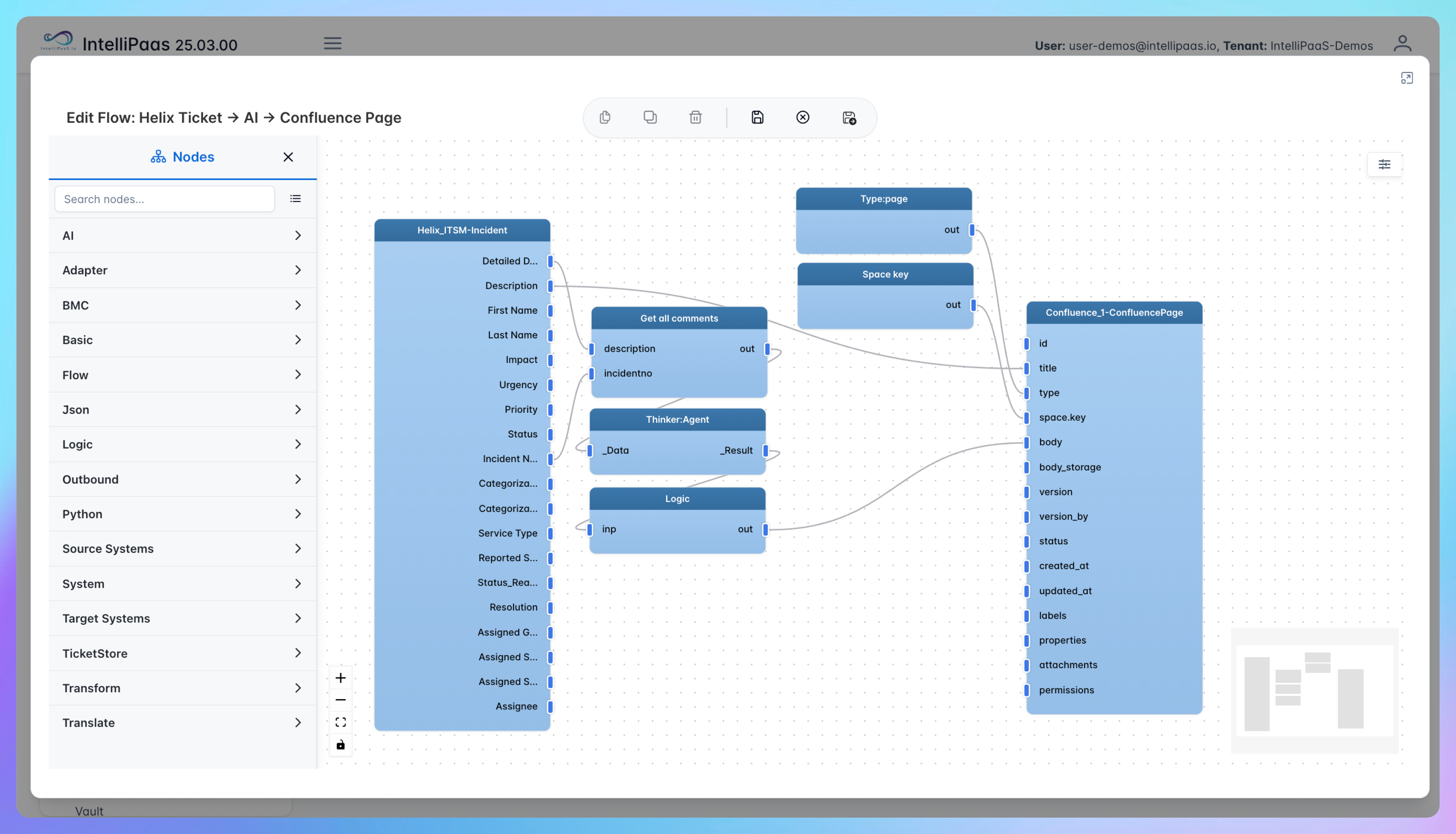

Automated Incident Documentation from Helix to Confluence
- An incident in BMC Helix ITSM is marked as resolved, with resolution notes, root cause, and fix details recorded in the ticket fields that IntelliPaaS monitors for this trigger.
- IntelliPaaS extracts the relevant incident data—including the problem description, affected systems, root cause analysis, and resolution steps—and structures it into a standardised article template.
- A new page is created in the designated Confluence space using the structured template, with the incident ID, title, and resolution date automatically populated as metadata for easy searching and filtering.
- The Confluence article is published and linked back to the original BMC Helix ticket, giving both the ITSM team and knowledge base users a two-way reference between the live incident record and the reusable documentation.
Use Case Highlights








Connectors in this Pack
Explore the individual connectors used in this integration:



Try for Free

.svg)


