
BigCommerce to Power BI Inventory

BigCommerce <-> Power BI

Automated real-time sync of BigCommerce inventory adjustments to Power BI so stock levels and product quantities are always current in your dashboards.

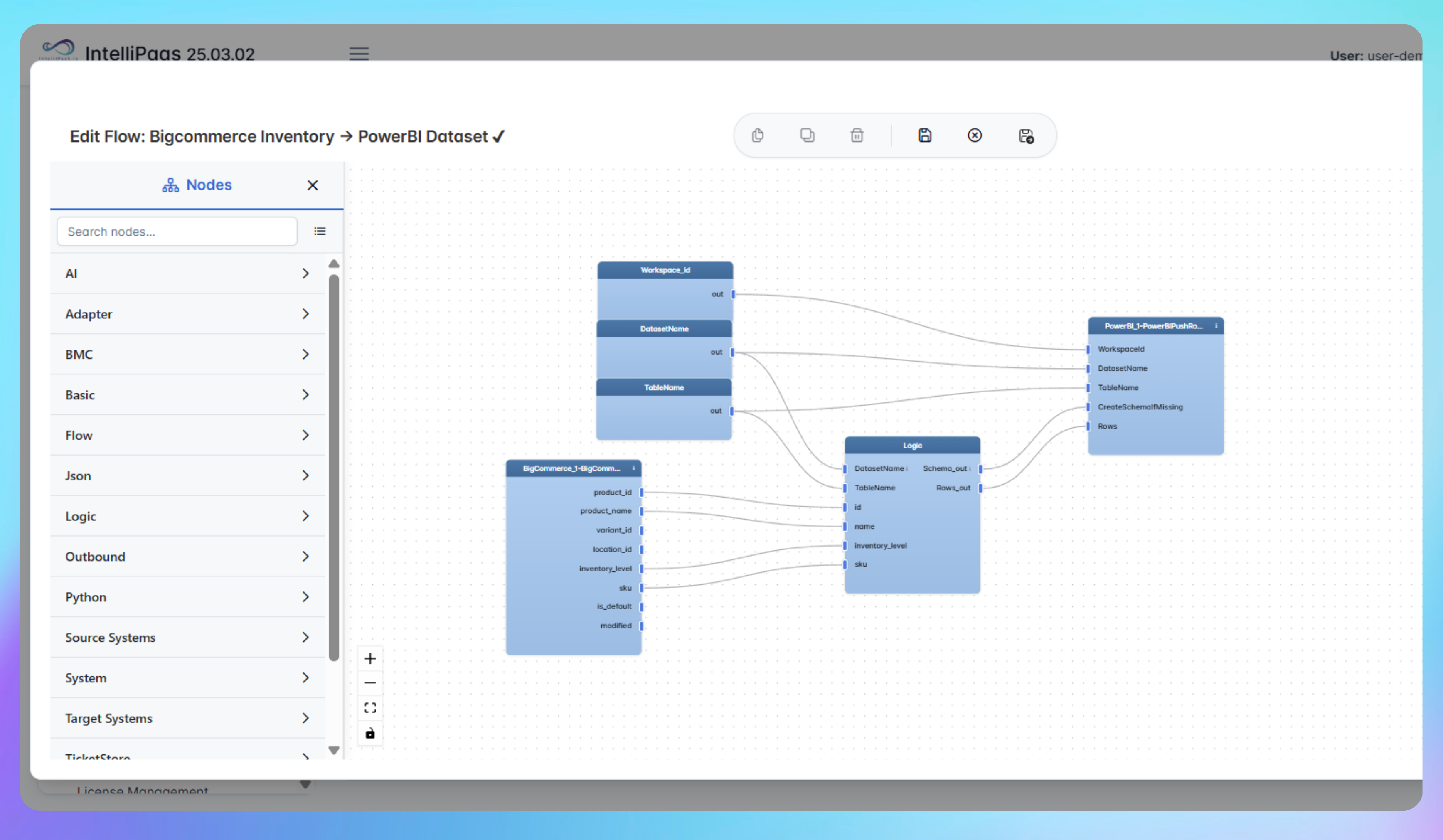
Retail operations teams using BigCommerce to manage stock often rely on manual exports or scheduled refreshes to update Power BI dashboards. By the time a planner checks inventory levels, the data may already reflect yesterday's position - leading to procurement decisions based on stale counts. This integration pack captures every stock adjustment in BigCommerce, whether an increase, decrease or restock, validates it and pushes it immediately to Power BI. Dashboards display the latest product quantities, update timestamps and historical movements so procurement, sales and operations teams always work from current data without waiting for a manual export.
IntelliPaaS Logo
BigCommerce + Power BI

Real-Time Inventory Sync from BigCommerce to Power BI

See how IntelliPaaS captures BigCommerce inventory adjustments and pushes them to Power BI instantly so stock levels and product quantities are always current in your dashboards.
IntelliPaaS Logo
Why Deploy This Use Case
  • An inventory adjustment is made in BigCommerce - a product quantity changes due to a sale, restock or manual update.
  • IntelliPaaS captures the change, validates it and pushes the updated quantity and timestamp to Power BI immediately.
  • The Power BI dashboard refreshes to show the current stock level and full change history for the updated product.
  • Procurement and planning teams see the live inventory position in Power BI without running a manual export.

Use Case Highlights

Instant inventory sync
Every BigCommerce inventory adjustment is captured and pushed to Power BI immediately so dashboards always display current product quantities.
Real-time dashboard refresh
Power BI dashboards update the moment a stock change occurs in BigCommerce so procurement and operations teams always work from current inventory data.
Full inventory change history
Product quantity, update timestamps and the full change history sync to Power BI so teams track inventory trends and spot issues without manual reporting.
Current data for procurement
Procurement teams make restocking decisions based on live BigCommerce inventory levels in Power BI rather than data from a manual export run hours earlier.
Eliminated manual exports
Manual inventory exports and scheduled data refreshes are replaced by automatic syncs so Power BI always reflects the current BigCommerce stock position.
Zero missed stock adjustments
Stock adjustments from BigCommerce push to Power BI without any manual step so no inventory change is missed even during high-volume trading periods.
AI-Enhanced Data Transformation
This is some text inside of a div block.
Visual Flow Builder
This is some text inside of a div block.
Pro-Code Extensibility
This is some text inside of a div block.
Global Deployment Options
This is some text inside of a div block.
Enterprise-Grade Security
This is some text inside of a div block.
Observability & Monitoring
This is some text inside of a div block.
Connect all your applications

Connectors in this Pack

Explore the individual connectors used in this integration:

IntelliPaaS Logo
Try for Free

Try for Free

Whether you’re exploring IntelliPaaS, need product guidance, or want to book a tailored demo – we’re here to help.
Greeting icon
Tell us how we can help
IntelliPaaS Logo
Thank you! Your submission as been received.
Thank you! Your submission has been received!
Oops! Something went wrong while submitting the form.

Ready to Take Control of Your Integrations?

Request your access to IntelliPaaS and see how teams like yours are eliminating risk, accelerating time-to-value and simplifying complexity.


